AI tools vs. Dedicated Excel File Compare Tool
AI tools are perfect in doing many spreadsheet tasks, but they are not intended for the spreadsheet comparison. Dedicated tools to compare Excel files have some important benefits over AI.
In context of the online and offline tool for comparing Excel files we will use one of the market leaders - xlCompare. AI tools - ChatGPT, Copilot, Gemini and Claud. We've tested them here.
Online Excel File Comparison Tool Advantages
-
Output Visualization
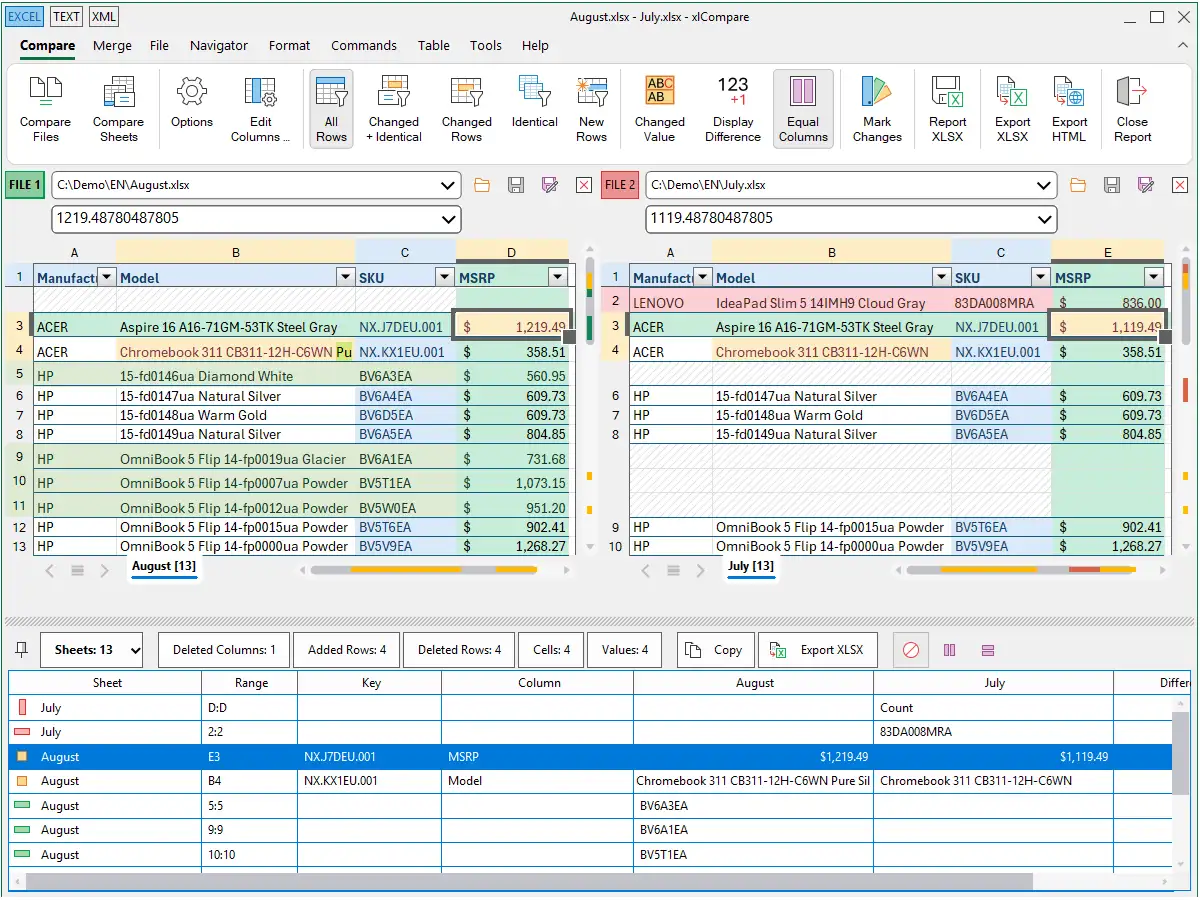
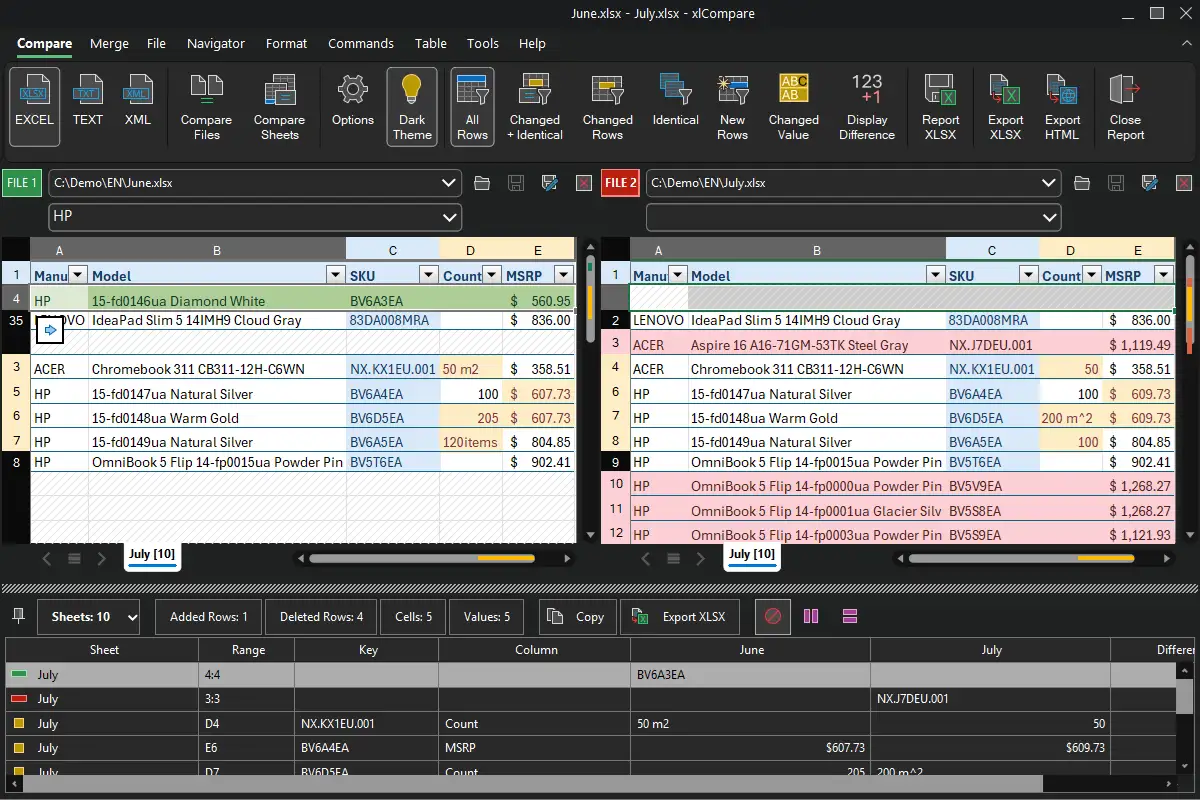
In this criteria xlCompare application is much better than AI tools. AI reports comparison summary using human language or exports it into XLSX or CSV format. UX used in AI tools is not optimized for this job.Dedicated tool (xlCompare) has the following:
- Side-by-side view
- Synchronous scrolling
- List of differences in separate window, that can be exported
- Navigation through list of changes\insertions\removals
- Merge functions
- Clean, downloadable report with highlighted differences
AI tools offer you only downloadable report from this list.
-
Focus on data
AI is mostly focused on semantics of processed data. It gives you explanation like "revenue in the 3-rd quarter increased by 3%", while the xlCompare points you to every changed cell and every changed number. AI tools are mostly focused on the meaning of the changed data while xlCompare points you to the exact, even minor differences.
Most of the AI tools interpret formulas as just text strings. xlCompare compares formulas on the expression level. If you insert or remove some rows - xlCompare correctly understands this and doesn't report false positive changes in the formulas, caused by this operation.
-
Privacy
Online application xlCompare.com and desktop xlCompare tool don't upload your spreadsheet to the servers. This is huge benefit. No one has access to your data. No data leakage. Your models are not used by someone else. AI tools require you to upload your spreadsheet to the web, that is often banned in the organizations. Please, note - some other diff checker tools also upload your data to the Internet for processing. We are talking about this benefit in context of xlCompare only.
-
Large file handling
Online services and desktop tools like xlCompare are optimized to quickly process large amounts of data, while AI takes much more time to upload large Excel files, process them and send the results back to your computer. AI tools are limited in context of processing large amounts of data. If your spreadsheet is too big it may be truncated by the AI tool.
-
Offline usage
AI doesn't work without stable Internet connection, while the desktop xlCompare tool is portable offline application you can use locally.
-
Accuracy
Online application always uses same algorithm and never tries to "interpret" the data. It follows the exact rules that are always the same. While the AI tool tries to summarize the data and may miss some low-level differences. So called "hallucination risk".
-
Tables with Key columns
xlCompare gives you full control on selecting right key for your table and visually represents it in the UX. xlCompare allows you to select complex key from several columns and multiline heading in your table. xlCompare perfectly works with table where values in key columns are not unique.
-
Git diff and Command Line Interface
Desktop xlCompare application is the only solution to work XLSX files stored in Git and other version control tools. AI doesn't have command line interface (CLI) and can't be integrated with our solutions.
Where does the AI win?
-
Data Interpretation
AI gives perfect summary on the human language. When xlCompare reports number of changed values and inserted rows, Gemini gives you description like "Price in July increased for 5% on some models". It is not possible to get such analytics information from the xlCompare application.
AI tool may suggest you perform data modification and corrections to the better results. xlCompare and other tools never do this.
-
Messy data
AI tool detects that some values have incorrect data type, extra characters and advise you to fix it. Desktop xlCompare tool has similar commands, but they are not automatic. You need to know about them and use them when needed. There are no automatic suggestions.
-
Processing Tables
AI automatically detects that you are working with table and find the key column in your table. While in the xlCompare you need to select the key column manually. But AI can make a mistake, so you need to double check the selection made by AI tool.
In fact, there are no other important benefits from our point of view.
The Bottom Line
AI tools are perfect for the small files that you agree to upload to the servers. But if you work with large files, private data that can't be shared or tables with keys and relationships - dedicated tool like xlCompare doesn't have alternatives. It gives you better output visualization, clean exportable report and transparency - you have full control when getting the results. There is no hallucination risk.
If you need to add a layer of data interpretation and receive a report on the human language - AI tool is the only option.
See Also
Using AI to compare Excel files
Can I use AI tool to identify differences between Excel files?
xlCompare vs. Spreadsheet Inquire
Spreadsheet Inquire is available in the Office 365 Professional ...
How to keep and review all the revisions of your XLSX file? Read this instruction if you are using Git in your development process.
Use xlCompare to compare and merge XLSX, XML and TEXT files with Command Line Interface.
Here you can download xlCompare
On this page you can download the most recent version of xlCompare. Save the setup file and install it on your computer.
Complete list of all xlCompare versions and modifications. Starting from first public release in 2009.